
Negotiating remote work pay is tricky. Your employer is in San Francisco, but you want to work from Portugal. Should your salary change? By how much?
A remote work salary adjustment calculator helps you figure out fair pay based on where you actually live. Unlike currency converters that only swap dollars for euros, these tools show what your money actually buys in different locations.
In this guide, you’ll learn how to use purchasing power parity to adjust remote salaries, negotiate location-based pay, and make informed decisions about where to work remotely. We’ll walk through verified examples and give you practical frameworks you can use today.
Key Takeaways
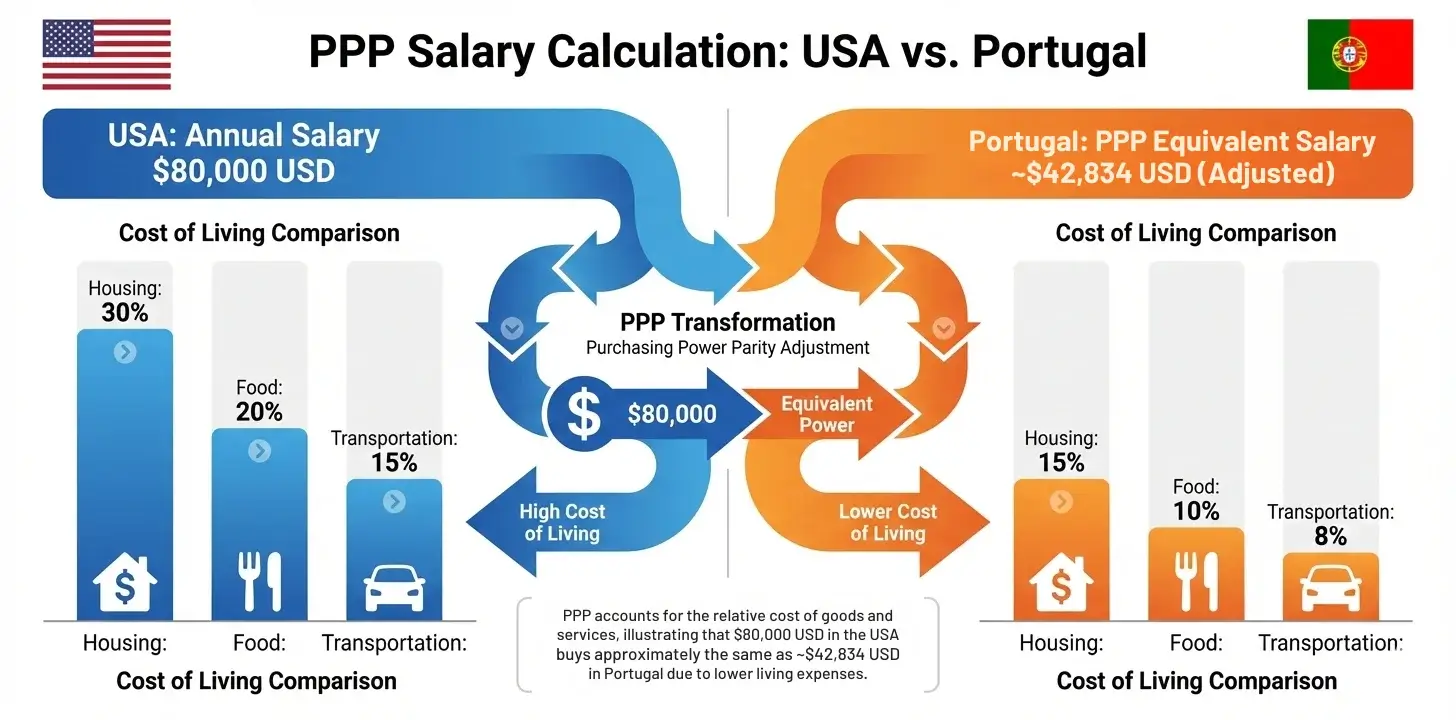
PPP calculators show real purchasing power, not just currency conversion. A $80,000 US salary equals €42,834 in Portugal in purchasing power terms—your money buys the same lifestyle in both locations.
Location-based pay cuts can still increase your wealth. Taking a 20% salary reduction to work from a country with 50% lower costs means you actually come out ahead financially while gaining lifestyle benefits.
Run multiple scenarios before negotiating. Calculate your purchasing power in 5-7 potential remote work destinations. Some locations surprise you—cheaper cities don’t always mean better value.
PPP is your starting point, not your final answer. Factor in taxes, visa requirements, career impact, and quality of life. The calculator gives you financial baseline data; your decision includes personal priorities beyond pure economics.
What is a Remote Work Salary Adjustment Calculator?
A remote work salary adjustment calculator compares the purchasing power of your salary across different countries or cities. It answers one critical question: how much should you earn in Location B to maintain the same lifestyle you have in Location A?
These calculators use purchasing power parity data to account for differences in cost of living. Housing costs less in Lisbon than London. Food is cheaper in Mexico City than Manhattan. The calculator factors in these real price differences.
Traditional currency conversion doesn’t help here. Converting $100,000 to euros tells you nothing about whether that money covers the same expenses in Porto versus Boston. PPP-based calculators solve this problem by comparing actual buying power.
Why Remote Workers Need Salary Adjustment Tools
Companies handle remote work pay in different ways. Some pay the same salary regardless of location. Others adjust based on local markets. Many fall somewhere in between.
You need data to navigate this. When your employer suggests a 30% pay cut to work from Thailand, is that fair? When you propose keeping your full salary while moving to a cheaper city, what’s reasonable?
A salary adjustment calculator gives you that data. You can show your employer actual cost differences. You can evaluate whether a location-based salary offer makes financial sense. You eliminate guesswork from the negotiation.
The tool also helps you choose where to work. Your $80,000 salary might stretch further in Barcelona than Berlin, even though both are in Europe. The calculator shows you exactly how much further.
How to Use the PPP Calculator for Salary Adjustments
Let’s walk through the process step by step using our free PPP calculator.
Step 1: Enter Your Current Salary and Location
Go to the PPP calculator and input your current salary in your home country’s currency. Be specific about your location, especially for large countries like the United States where costs vary significantly by region.
For this example, we’ll use a marketing manager earning $90,000 in the United States.
Step 2: Select Your Target Work Location
Choose where you’re considering working remotely. The calculator includes 180+ countries, covering most remote work destinations.
Let’s say you’re exploring Portugal as a remote work destination.
Step 3: Review Your Adjusted Salary
The calculator shows what you’d need to earn in your target location to maintain equivalent purchasing power. To have the same purchasing power as $80,000 in the USA, you would need €42,834 in Portugal.
This doesn’t mean you should accept a 47% pay cut. It means housing, food, and other expenses cost less in Portugal. Your euros buy more than your dollars did.
Step 4: Calculate Multiple Scenarios
Run several calculations to compare different locations. You might be surprised which countries offer better value.
For our $80,000 US salary:
- In Thailand, equivalent purchasing power is ฿852,160
- In Mexico, it’s $7,91,000 MXN
- In India, it’s ₹1,616,200 INR
Each calculation shows you exactly what lifestyle that salary supports in each country.
Understanding Your Results
The calculator output requires correct interpretation. This is where many people get confused.
When the calculator shows that $80,000 in the USA equals €42,834 in Portugal, it means those amounts buy the same basket of goods and services in their respective countries. It does NOT mean you should accept €42,834 if you’re currently earning $90,000.
Here’s why: if you’re working remotely for a US company while living in Portugal, you might negotiate to keep most of your US salary while benefiting from lower Portuguese costs. Your actual purchasing power increases because you earn US dollars but spend in a cheaper market.
The calculator helps you understand how much purchasing power you’re gaining or losing with different salary and location combinations. Use it as a starting point for negotiations, not as the final answer.
Real Remote Work Salary Scenarios
Let’s look at verified examples of how remote workers use salary adjustment calculations.
Scenario 1: Tech Worker Moving from US to Portugal
Current situation: Software engineer earning $120,000 in San Francisco
Proposed move: Relocating to Lisbon, Portugal while keeping remote job
PPP calculation: To match $120,000 US purchasing power in Portugal requires €64,200
Negotiation outcome: Worker negotiates $105,000 salary (12.5% reduction). Even with the pay cut, their purchasing power increases because Lisbon costs significantly less than San Francisco. They come out ahead financially while gaining quality of life benefits.
Scenario 2: Designer Relocating from Canada to Mexico
Current situation: UX designer earning $75,000 CAD in Toronto
Proposed move: Working from Mexico City
PPP calculation: $75,000 CAD in Canada equals $652,344 MXN in Mexico
Negotiation outcome: Designer keeps full Canadian salary. Their purchasing power nearly doubles because the Canadian dollar buys significantly more in Mexico. They negotiate to maintain their $75,000 CAD while enjoying lower Mexican living costs.
Scenario 3: Marketing Manager Going from UK to Thailand
Current situation: Earning £60,000 in London
Proposed move: Remote work from Bangkok
PPP calculation: £60,000 UK purchasing power equals ฿935,880 in Thailand
Negotiation outcome: Company proposes £48,000 (20% cut). Worker uses PPP data to counter-propose £52,000 (13% cut), showing this still gives them 50% more purchasing power than they had in London. Company accepts.
Salary Negotiation Framework for Remote Workers

Use this framework when discussing location-based pay adjustments.
Before the Conversation
Calculate your current purchasing power and what you’d need in your target location. Run the numbers for 3-4 potential destinations so you have options. Document the results with screenshots from the calculator.
Research market rates for your role in both locations. PPP data is one input, but you should also know what local professionals earn. Combine both data sources for stronger negotiations.
Making Your Case
Present your research professionally. Share the PPP data showing cost differences between locations. Explain that you’re not asking for location-arbitrage advantage, just fair compensation for your value to the company.
If your company uses location-based pay, propose a middle ground. Many companies split the difference, giving you some benefit from lower costs while also reducing their payroll expense.
Frame the move as beneficial to the company. Lower salary costs, access to you during different time zones, or reduced office space needs all strengthen your position.
Common Employer Objections
“We pay based on local market rates.”
Counter with: “I understand market-based pay, but my role’s value to the company doesn’t change based on my location. I’m proposing [X%] reduction based on PPP data, which is fairer than pure local rates.”
“Other remote workers in that country earn less.”
Counter with: “That’s true for local hiring, but I bring [specific value/experience]. PPP shows [Y%] cost difference, and I’m proposing an adjustment that reflects both my value and location costs.”
“We can’t make exceptions.”
Counter with: “Many companies now use hybrid models. Could we discuss a trial period or performance-based adjustment?”
Comparing Multiple Remote Work Destinations
When choosing where to work remotely, create a comparison spreadsheet. Use the PPP calculator to run your salary through 5-7 potential locations.
Calculate the effective value for each option. If you earn $80,000 working from the USA, compare what that same $80,000 buys in different countries. Also run the reverse calculation, showing what you’d need to earn locally to match your current lifestyle.
Consider factors beyond pure purchasing power. Visa requirements, tax implications, healthcare costs, and time zone differences all matter. The calculator gives you the financial baseline, but your decision includes other variables.
Some remote workers optimize purely for purchasing power, choosing the cheapest quality destinations. Others prioritize community, infrastructure, or specific lifestyle factors. Use PPP data as one important input among several.
Common Mistakes to Avoid
Treating PPP as Currency Conversion: The biggest mistake is confusing PPP calculations with exchange rates. If your calculator shows $90,000 equals €48,150 in Portugal, that’s not a currency conversion. It’s a purchasing power comparison. The actual currency conversion would be different. Always interpret results as “what this amount buys” not “what this amount converts to.”
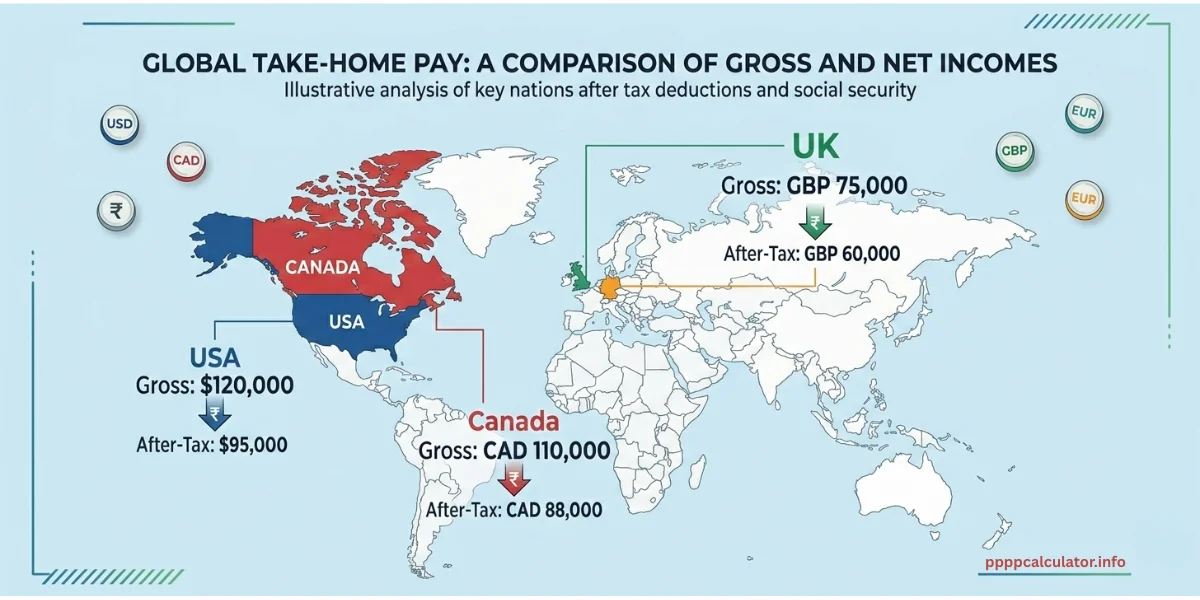
Ignoring Taxes: PPP calculations don’t include taxes. A $100,000 gross salary might net you $75,000 after US taxes, while the same gross in Portugal nets different amounts. Factor in tax rates separately from PPP calculations. Research tax treaties, foreign earned income exclusions, and local tax rates. These can significantly impact your actual take-home pay and purchasing power.
Using Only PPP Data: PPP gives you the cost of living comparison, but don’t ignore market rates. Some employers pay globally competitive rates regardless of location. Others strictly follow local markets. Your negotiation position depends on understanding both.
Forgetting to Update Calculations: PPP conversion factors change annually as prices shift. Always use current data. Last year’s calculations may not reflect current price levels, especially in countries with high inflation or currency volatility.
Advanced Considerations for Remote Workers
Quality of Life Adjustments
Some remote workers accept lower purchasing power for better quality of life. Shorter commutes, better weather, proximity to family, or preferred culture might be worth earning slightly less.
Calculate the monetary value you place on these factors. If working from Barcelona versus Berlin means 10% less purchasing power but significantly better lifestyle, is that worth it to you? Only you can answer, but quantifying the tradeoff helps.
Career Impact
Consider how location affects your career trajectory. Working remotely from a lower-cost country while earning good money sounds ideal. But does it limit networking, reduce promotion chances, or affect how your employer views you?
Some remote workers maintain higher salaries by staying in expensive cities precisely because it signals commitment and availability. Others build strong remote careers from anywhere. Your industry and role determine which path makes sense.
Building Location Flexibility
Many remote workers negotiate location-independent salaries by demonstrating consistent high performance first. Prove your value for 12-18 months, then discuss location flexibility. Companies often prefer retaining proven performers over hiring replacements, giving you leverage.
Document your productivity, impact, and deliverables carefully. When negotiating remote work and compensation, show how your location doesn’t diminish your contribution.
Next Steps
Start by calculating your current salary’s purchasing power in 3-5 locations you’d consider for remote work. Use our free PPP calculator to run the numbers now. Document your findings. Screenshot the results, note the dates, and create a simple comparison spreadsheet. This becomes your negotiation toolkit.
Research your company’s remote work policies. Do they already have location-based pay structures? How have they handled remote work requests before? Understanding their position helps you frame your proposal effectively.
When you’re ready to negotiate, approach it as a collaborative discussion. Present the data, explain your thinking, and be open to compromise. The goal is fair compensation that works for both you and your employer.
Remote work combined with smart location choices can dramatically improve your financial situation and quality of life. The salary adjustment calculator gives you the data to make those choices confidently.
Ready to calculate your purchasing power? Use our PPP calculator to see what your salary is really worth anywhere in the world.
FAQ – Remote Work Salary Adjustment Calculator
Ans: It depends on company policy. Many companies adjust salaries based on location costs, while others maintain global pay rates. Use PPP data to negotiate a fair middle ground where both you and your employer benefit from cost differences.
Ans: Use a PPP calculator by entering your current salary and location, then selecting your target country. The result shows what you’d need to earn there for equivalent purchasing power, giving you a baseline for negotiations.
Ans: Most fair adjustments fall between 40-60% of the PPP difference. If costs are 50% lower in your new location, expect salary reductions of 20-30% while still increasing your actual purchasing power.
Ans: Yes, many remote workers negotiate keeping their full salary when relocating. This works best after proving your value for 12-18 months and when your role doesn’t require physical presence in expensive locations.
Ans: No, PPP calculators show gross purchasing power before taxes. You must research tax rates separately in both countries, as tax obligations significantly impact your actual take-home pay and real purchasing power.

Jitender is the founder and lead developer of PPPCalculator.info. He created this free tool to bridge the gap between currency conversion and real purchasing power, helping professionals across 50+ countries make informed salary decisions. He regularly translates complex World Bank and OECD data into practical guides for remote workers and expats.